What I Got Wrong About Document Modelling
Picking MongoDB takes five minutes. Deciding what one record should contain takes months to get wrong and is painful to undo.

On this page
There are two broad ways to store data, and the difference is easiest to see as furniture.
The old way is a filing cabinet. Every drawer holds one kind of card, every card has exactly the same printed fields, and if you want a customer and their orders together you pull from two drawers and match them up. This is a relational database — Postgres, MySQL. Matching the drawers is called a join, and these systems are extremely good at it.
The newer way is a folder. One customer, one folder, and whatever belongs to them goes inside — orders, notes, addresses. No matching required, because it is already together. This is a document database, and MongoDB is the one most people meet first.
The pitch that sells the folder is that you do not need to decide what goes in it. That is the sentence I believed for far too long, and every modelling mistake I have made traces back to it.
You always have a shape. The only question is whether it is written down somewhere a machine can check, or scattered across whatever code happens to read the folder.
None of this is an argument against document databases. It is the list of things I had to learn the hard way, which are mostly one lesson from different angles.
Design for the questions, not the nouns
The instinct you carry over from filing cabinets is to list the nouns and give each one a drawer. Users, orders, products, comments. It feels tidy. For folders it is precisely backwards.
Relational design deliberately splits things up and lets the database reassemble them when you ask. That is what joins are for. A document database has no equivalent — so a shape needing five folders opened per screen is not a neutral choice. It is a decision to do the reassembling yourself, in your own code, over the network, on every single request, forever.
The better question is not what are my things but what do I read together, and how often?
On a CRM I worked on, contacts and their history of interactions lived in separate collections, because they are obviously separate things. Every screen in the product showed them together. Every page load was two trips to the database and a merge, and the merge code is where the bugs lived.
They were separate because a diagram said so, not because anything in the application ever wanted them apart.
Lists that grow forever are the trap
Putting things inside the folder solves the reading problem so neatly that it becomes the automatic answer — and then you meet the case where it does not fit.
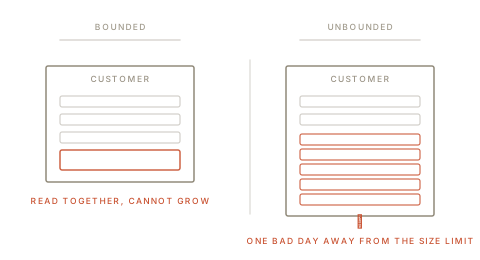
The trouble is any list with no natural end. Comments on a post. Events in a session. Messages in a conversation. Each looks like a textbook child: it belongs to exactly one parent, so tuck it inside.
But now the folder grows without limit, and three unpleasant things follow.
Every read drags the whole list along, even when you wanted one field off the front.
Every addition rewrites the whole folder, and once it outgrows the space set aside for it, the database has to pick it up and move it somewhere roomier.
There is a hard size limit waiting at the end, which you will meet in production, on your busiest record — because the biggest folder is by definition the one belonging to your best customer.
The test is one question: can somebody, just by using the product normally, make this list as long as they like? If yes, it belongs in its own collection with a pointer back. You have accepted a second query in exchange for a system with no cliff in it.
Copying data is a promise you have to keep
Writing a customer's name into every order makes reading an order trivial. It also means their name now lives in an unknown number of places, and changing it becomes a job you have to design, run and check.
I am not against this. For data that is read constantly and changed rarely, copying is often right. And sometimes the copy is more correct than a pointer would be.
An invoice should record the address it was sent to at the time. Not the address the customer has today. That is not a performance shortcut — that is the truth, and looking up the current address would be a bug.
The mistake is failing to tell those two cases apart. A copy-for-speed is an optimisation carrying an obligation. A copy-for-history is simply the data. Writing them the same way, and remembering which is which by instinct, is how you end up with an update that fixes four of the five places a name appears.
If you copy something that can change, write down where the copies live the moment there are two. That comment will be worth more than most of the code around it.
"No fixed shape" is a deployment trick
The freedom to put any shape into a folder is genuinely valuable, and its value is almost entirely about changing things safely.
You can ship code that writes a new field before you have filled it in on the old records. You can support two shapes at once while a release rolls out. That is real, and much better than a locked-down table.
What it is not is permission to skip deciding. Without a decision you get drift. Some records have email. Some have emailAddress. Some have both, and they disagree. Every piece of reading code grows a fallback. Six months later nobody can tell you what a record contains without opening one, and the honest answer is "it depends when it was written."
So I now switch on validation for every collection that matters — a rule the database itself enforces, rejecting anything malformed at the door.
This site's articles live in a collection with exactly that: required fields, a fixed list of allowed statuses and sections, dates that must be real dates rather than text that merely looks like a date. It took half an hour. It has caught bad writes from my own scripts. And it did not remove a single thing I actually wanted from a document database.
Indexes decide whether any of it works
Your folder design is a guess about which questions get asked. Indexes — the database's equivalent of a book's index — are how you find out whether the guess was right.
The failure is invisible in development, where scanning 200 records is instant, and extremely visible in production, where scanning two million is not.
Two habits pay for themselves over and over. Ask the database to explain how it plans to answer any query on a busy path — if it says it is going to read everything, that is a five-second check saving a five-hour incident. And build the index to match the question: when an index covers several fields, the order of those fields decides which questions it can help with, and an index in the wrong order is dead weight that still slows down every write.
What I would do differently
- Write down the questions the app needs to ask, before designing a single record.
- Tuck in what is bounded and read together; keep out anything that can grow.
- Switch on validation immediately, and treat it as documentation that runs.
- Record where every copy lives, the moment there is more than one.
- Check the query plan on busy paths before shipping, not after complaints.
The database was never the decision. The decision is what one record contains — and unlike the database, that is not a thing you can swap out on a Tuesday.